for developers
Gantt charts
from Markdown
A lightweight CLI tool that generates beautiful Gantt charts from GitHub-Flavored Markdown task lists.
Fast, simple, and developer-friendly. Transform your project planning into visual timelines in seconds.
One-line install:
curl -sSL
  https://raw.githubusercontent.com/sev101/ganttdown/main/scripts/install.sh | bash
Why Ganttdown
Built for how you already work
Markdown-first
Version-controlled, diffable, reviewable.
Automation-ready
Perfect for CI/CD and scripts.
Fast & lightweight
Single binary, no dependencies.
Dependency-aware
Validation, warnings, and arrows.
Presentation-ready SVGs
Embed anywhere.
How it works
Transform your project planning into visual timelines in three simple steps
Write Markdown
Create tasks using familiar GitHub-Flavored Markdown syntax with checkboxes, dates, and assignees.
Run Command
Execute the ganttdown CLI tool to parse your markdown and generate visual timelines instantly.
Get SVG Chart
Receive a beautiful, shareable SVG Gantt chart with dependencies, progress, and timeline.
Ready to get started?
ganttdown tasks.md > chart.svgFeatures
Everything you need to plan and ship. Dependencies, statuses, dates, and assignees that just work.
Dependency validation & warnings
Catch broken links and circular deps before you render.
Status colors
Pending, in progress, overdue, and done at a glance.
Flexible date parsing
ISO, US, or European formats. All work.
Assignees & sections
Owners and headings right in the markdown.
CI/CD compatibility
Single command, no GUI. Fits any pipeline.
Built for your workflow
Real teams, real outcomes. Pick your story.
Sprint Planning for Dev Teams: Ship on time with visible dependencies
Markdown
SVG
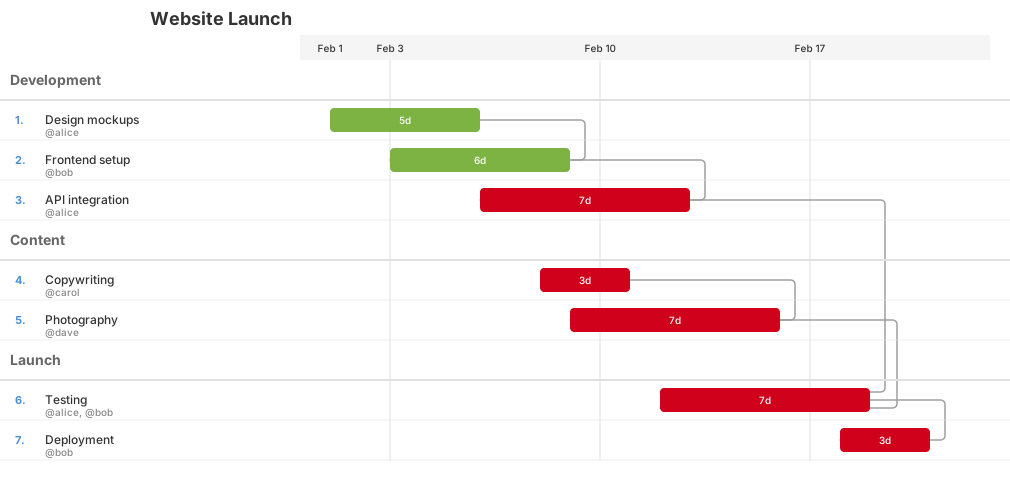
Generated with:
ganttdown simple-project.md > simple-project.svgCompare with alternatives
See how Ganttdown stacks up against other project planning tools
| Feature | Ganttdown | Mermaid | Excel | PM Tools |
|---|---|---|---|---|
| Markdown-native | ||||
| CI/CD friendly | ||||
| Dependency validation | ||||
| Version control |
Stop fighting project tools. Plan in Markdown.